🧩 Architecture Components
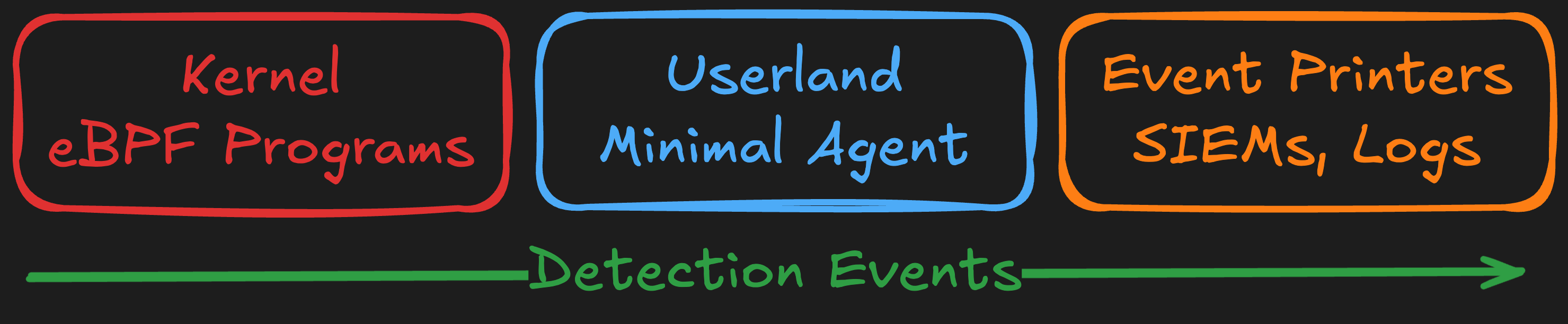
Jibril's architecture is built on a modular system of functionalities and features that work together to provide comprehensive runtime security monitoring and enforcement. This modular design enables flexibility, extensibility, and precise control over monitoring capabilities.
🔌 Modular by Design
Functionalities provide the core engine, while features
add specialized capabilities you can enable or disable.
This architecture allows you to enable only what you need,
minimizing overhead while maximizing security coverage.
🏗️ Architecture Layers
⚙️ Functionalities
Core runtime engine providing foundational eBPF monitoring, data storage, and detection orchestration.
🔌 Features
Specialized modules that extend Jibril's capabilities for detection, network policy, reactions, and more.
🖨️ Printers
Output handlers controlling where and how detection events are sent—stdout, log files, or external systems.
⚙️ Functionalities
Functionalities are the core components that power Jibril's monitoring engine:
❤️ Jibril Functionality
The main runtime security engine
The core functionality orchestrates all detection and monitoring capabilities, providing:
Built-in Capabilities:
- Config management - Context from userland to eBPF programs
- Data structures - eBPF maps, virtual maps, and tries for efficient storage
- Query-driven architecture - On-demand data retrieval from kernel space
Feature Orchestration:
- Process and file tracking
- Network monitoring
- Detection logic coordination
- Policy enforcement
- Output handling
Configuration:
functionalities:
  - jibril   # Core jibril functionality (required)
Why it matters: Provides the foundation that makes all features possible.
🧪 Tests Functionality
Validation and testing framework
Optional functionality for testing and validating Jibril's components:
- Task argument validation
- File/directory/base tracking tests
- Flow relationship testing
- Virtual map functionality
- Network policy validation
Configuration:
functionalities:
  - jibril
  - tests    # Enable testing functionality
Why it matters: Ensures reliability during development and deployment validation.
🔌 Features
Features extend Jibril's core functionality with specialized capabilities:
⏸️ Hold Feature
Continuous monitoring mode
Keeps Jibril running until explicitly stopped (Ctrl+C or SIGTERM). Essential for production deployments requiring continuous monitoring.
Configuration:
features:
  - hold
Use case: Production deployments, long-running security monitoring
📂 Procfs Feature
Existing process discovery
Reads /proc filesystem during startup to populate eBPF maps with existing processes, ensuring complete visibility from the moment Jibril starts.
Configuration:
features:
  - procfs
Use case: Avoid blind spots during initial deployment
🌐 Netpolicy Feature
Network policy enforcement
Enforces network policies based on CIDR blocks and domain names. Capable of blocking DNS resolutions and network connections synchronously.
Capabilities:
- CIDR-based IP blocking
- Domain-based blocking
- DNS query interception
- Real-time policy evaluation
Configuration:
features:
  - netpolicy

feature_options:
  netpolicy:
    file: /etc/jibril/netpolicy.yaml
Use case: Block malicious IPs and C2 domains
🔍 Detect Feature
Built-in detection recipes
Enables Jibril's comprehensive library of 70+ built-in detection recipes for file access, execution, and network threats.
Capabilities:
- File access monitoring
- Execution pattern detection
- Network peer analysis
- MITRE ATT&CK coverage
Configuration:
features:
  - detect
Use case: Production threat detection with proven recipes
⚗️ Alchemies Feature
Custom detection recipes
Enables custom detection logic using YAML-based alchemies for environment-specific threats.
Configuration:
features:
  - alchemies

feature_options:
  alchemies:
    builtin:
      enabled: true
    private:
      enabled: true
      paths:
        - /etc/jibril/alchemies/private
Use case: Custom detections tailored to your environment
🤖 Attenuator Feature
AI-powered false positive reduction
Uses machine learning to filter or amend detections that are likely false positives.
Capabilities:
- Context-aware filtering
- Automatic tuning over time
- Amend or block mode
Configuration:
features:
  - attenuator

feature_options:
  attenuator:
    enabled: true
    url: https://api.openai.com/v1/chat/completions
    model: gpt-4o
    mode: amend
Use case: Reduce alert fatigue in production
🖨️ Printers
Printers control where and how Jibril outputs detection events:
📺 Stdout Printer
Real-time console output
Streams detection events to standard output in JSON format.
Best for:
- Docker/Kubernetes deployments
- Logging driver integration
- Development and testing
- Real-time monitoring dashboards
Configuration:
printers:
  - stdout

printer_options:
  stdout:
    raw: false
📝 Varlog Printer
Persistent file logging
Writes detection events to /var/log/jibril.out for persistent storage.
Best for:
- Traditional logging infrastructure
- Log rotation and archival
- Compliance requirements
- Offline analysis
Configuration:
printers:
  - varlog

printer_options:
  varlog:
    raw: true
    file: /var/log/jibril.out
📊 Detection Events
Jibril generates events based on enabled features and detection recipes:
🚫 Network Policy Events
Events generated when the netpolicy feature blocks traffic:
dropip - Alerts when network flows are dropped due to CIDR or domain restrictions
Configuration:
events:
  - dropip
🔍 Detection Events
Events generated by the detect feature across three categories:
📁 File Access - 30+ detections for credential access, configuration tampering, and system fingerprinting
⚙️ Execution - 25+ detections for suspicious process execution, code injection, and malicious tools
🌍 Network Peers - 15+ detections for malware C2, phishing domains, and suspicious connections
Configuration:
events:
  - auth_logs_tamper
  - binary_self_deletion
  - credentials_files_access
  - crypto_miner_execution
  - webserver_shell_exec
  - threat_domain_access_light
  # ... enable specific recipes
📊 Flow Events
flow - Comprehensive network flow information for all connections
Generated when the flow event is enabled, providing visibility into all network activity regardless of detection rules.
Configuration:
events:
  - flow
The
network-flowscadence configuration option will determine the frequency of this event. This event is generated for all network connections, regardless of detection rules.
🎯 Complete Configuration Example
View complete configuration with all components
# Core functionality
functionalities:
  - jibril

# Enabled features
features:
  - hold        # Keep running
  - procfs      # Discover existing processes
  - netpolicy   # Network policy enforcement
  - detect      # Built-in detections
  - alchemies   # Custom detections
  - attenuator  # AI-powered filtering

# Feature configuration
feature_options:
  netpolicy:
    file: /etc/jibril/netpolicy.yaml
  alchemies:
    builtin:
      enabled: true
  attenuator:
    enabled: true
    model: gpt-4o
    mode: amend

# Output destinations
printers:
  - stdout
  - varlog

printer_options:
  stdout:
    raw: false
  varlog:
    raw: true
    file: /var/log/jibril.out

# Enabled detection events
events:
  - dropip
  - credentials_files_access
  - webserver_shell_exec
  - threat_domain_access_light